윈도우 11을 처음 설치한 상태에서 PC를 사용하다 보면 내가 사용한 파일과 검색 기록이 그대로 윈도우 기록에 남는 다는 것을 깨닫게 됩니다. 혼자 사용하는 PC라면 상관이 없으나 내 PC를 다른 사람과 공유하게 되면 은밀한 사생활이 노출될 염려가 있습니다. 이번 글에서는 윈도우 11의 최근 열어본 항목과 검색 기록 삭제 하는 방법을 소개하도록 하겠습니다.
윈도우 11 최근에 연 항목 숨기기
검색 기록 삭제 에 앞서 먼저 최근에 사용한 파일 목록부터 삭제하고 비활성화 하는 방법 부터 알아보도록 하겠습니다.
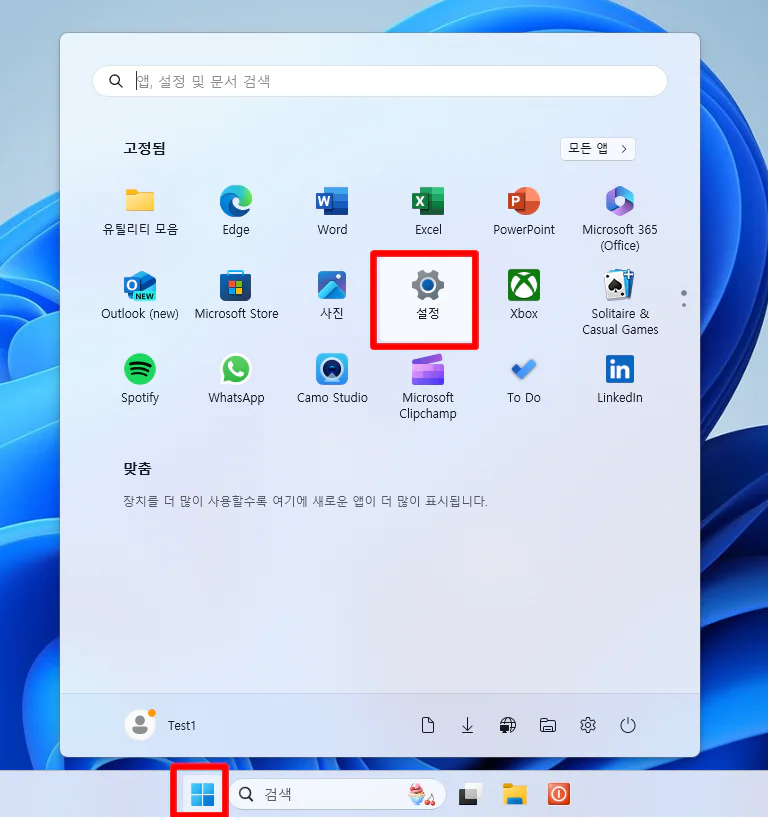
“시작“ -> “설정”
윈도우 키를 눌러 시작 메뉴를 띄우고 설정 페이지로 진입합니다.
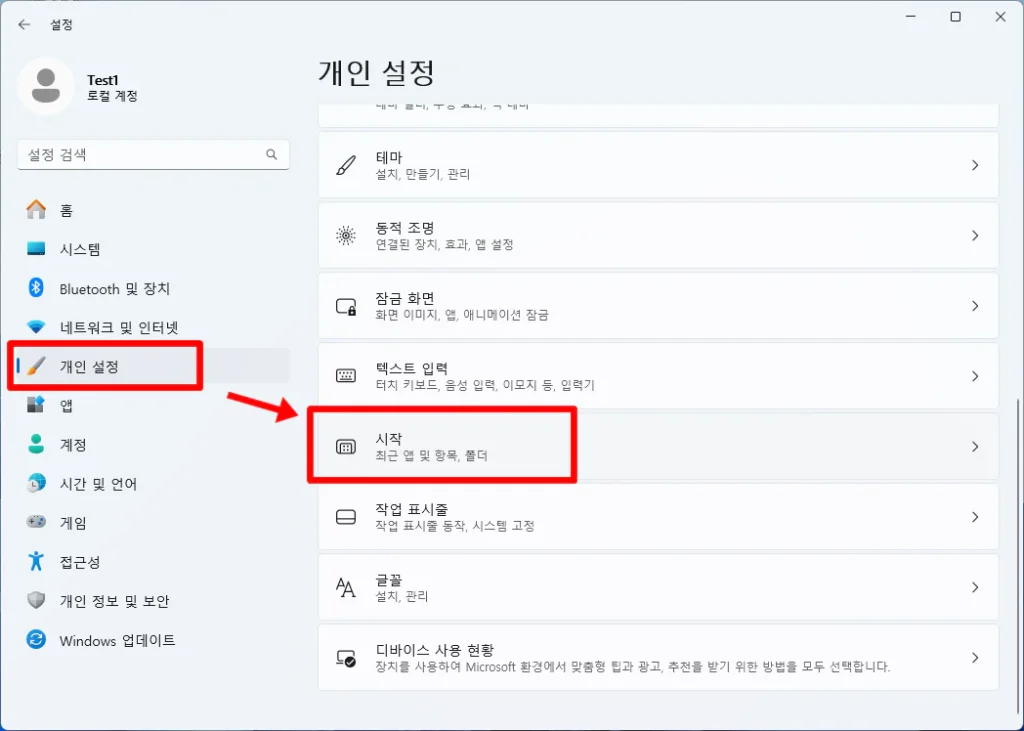
설정 페이지 왼쪽 사이드 탭의 “개인 설정” 을 선택하고
하위 메뉴 중 “시작” 을 찾아 클릭합니다.
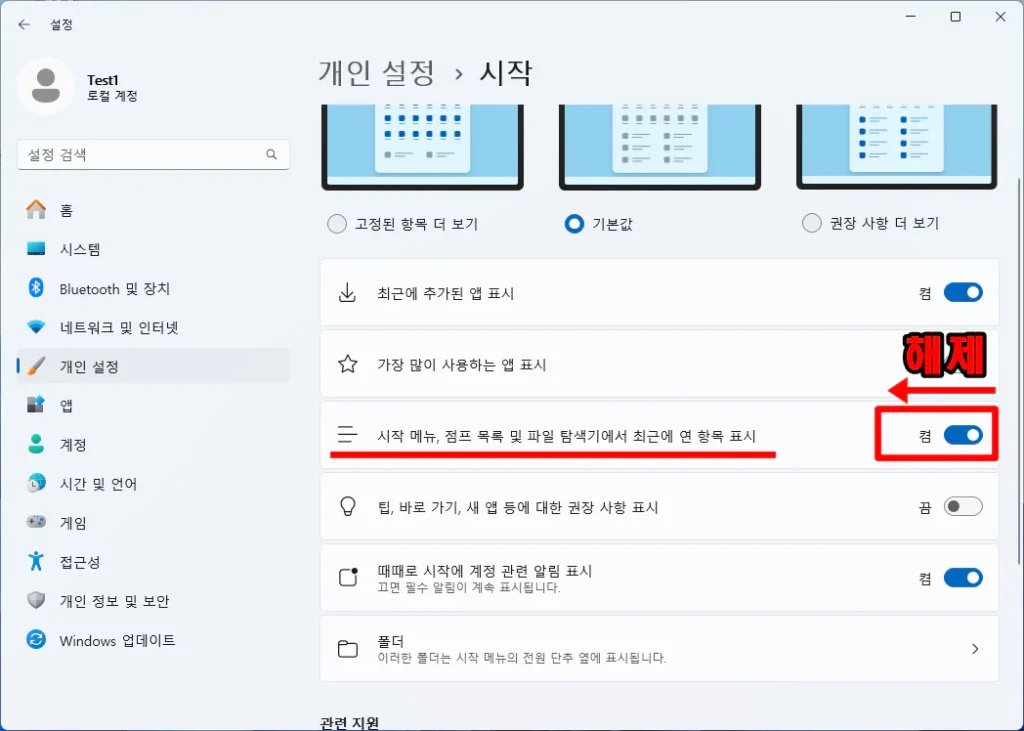
우선적으로 “시작 메뉴, 점프 목록 및 파일 탐색기에서 최근에 연 항목 표시” 항목을 비활성화 합니다.
부가적으로 자신이 자주 사용하는 프로그램 항목도 노출하고 싶지 않다면 그 윗 항목
“가장 많이 사용하는 앱 표시” 를 비활성화 합니다.
기존 윈도우에서의 방법
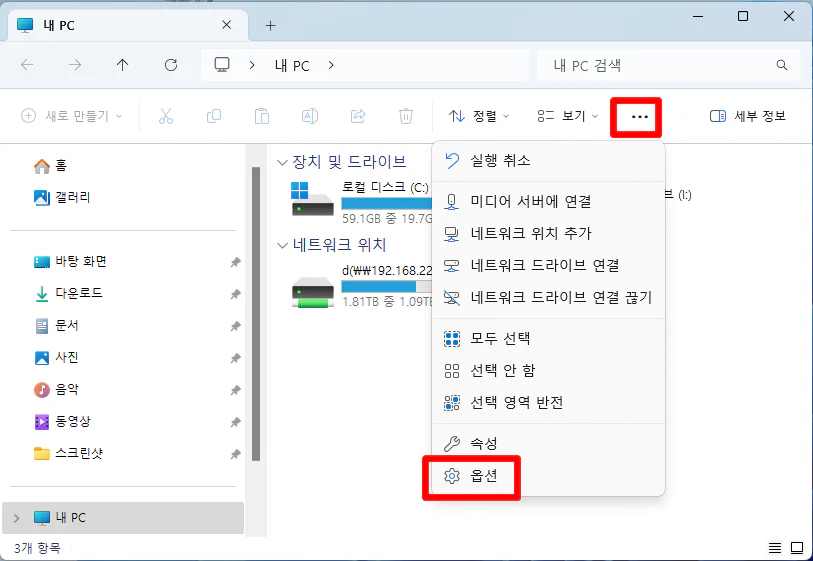
기존의 윈도우 에서는 파일 탐색기를 열어 폴더 옵션에서 수정해야 하였었습니다. 이 방법은 윈도우 11에서 아직 사용 가능 합니다.
파일 탐색기에서 상단 탭 “…” 을 클릭하고 “옵션” 을 선택합니다.
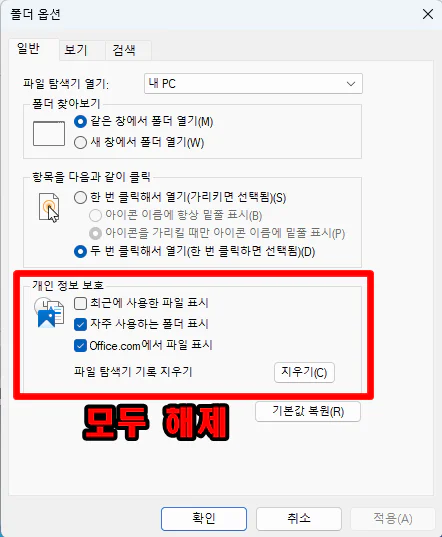
폴더 옵션 페이지가 뜨면 개인 “정보 보호 항목“의 모든 항목을 비활성화 해줍니다.
윈도우 검색 기록 삭제
이번에는 윈도우에서 검색 키워드를 저장하지 않고 비활성화 하는 방법에 대해서 알아보겠습니다.
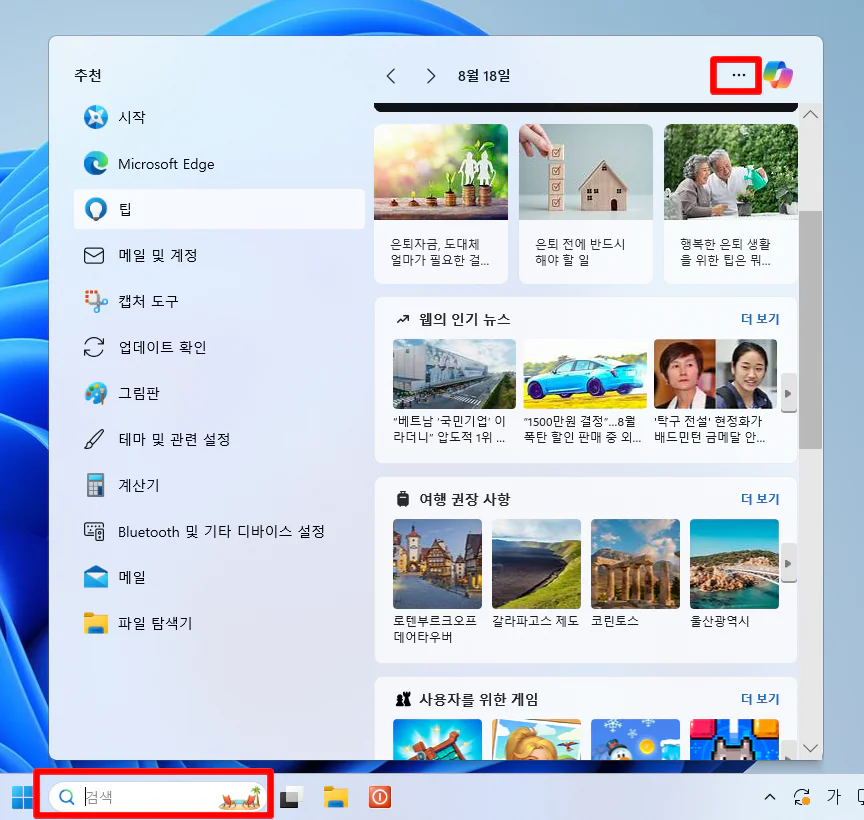
작업 표시줄 의 “돋보기” 모양을 클릭하여 검색 창을 띄웁니다.
그런다면 우측 상단의 “…” 버튼을 클릭합니다.
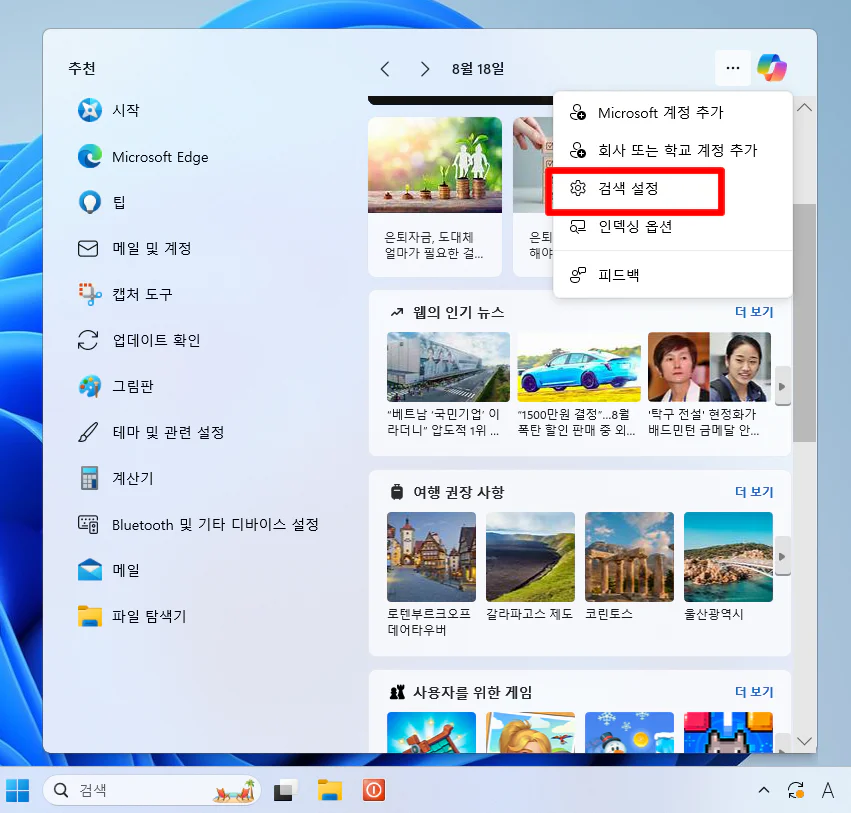
몇몇 옵션이 뜨는데요. 그 중에서 “검색 설정” 을 클릭합니다.
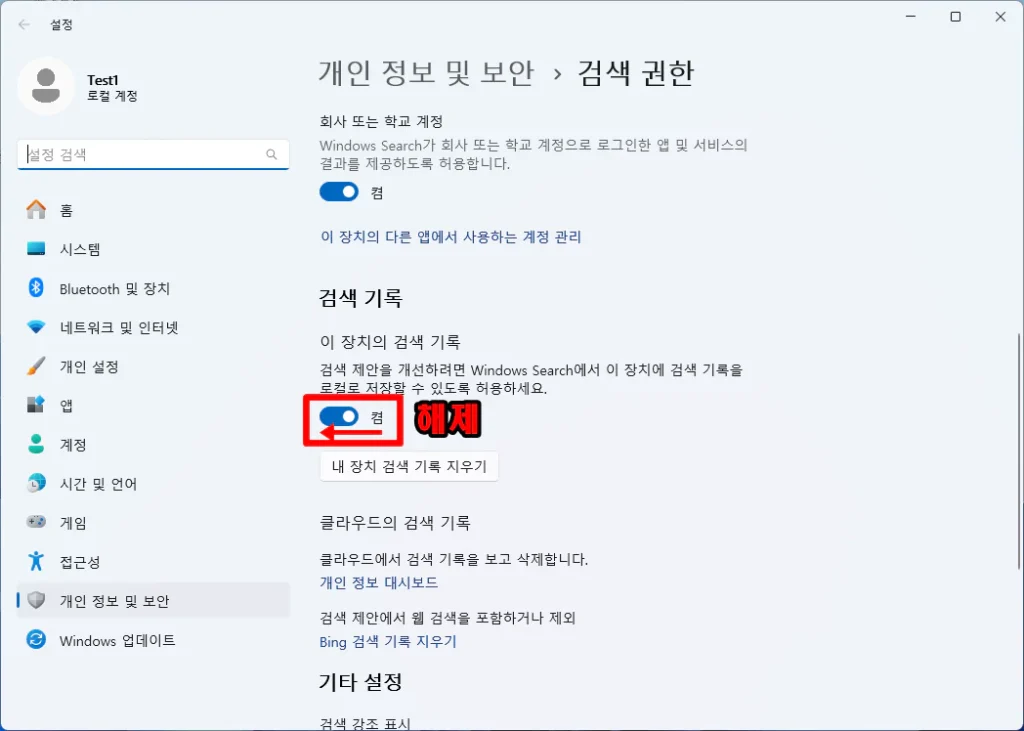
설정 페이지가 뜨면 검색 “이 장치의 검색 기록” 옵션을 비활성화 합니다. 이렇게 하면 검색 기록이 더 이상 남지 않게 됩니다.
만약 검색 기록 남김을 지속해서 유지하고 기록 키워드만 삭제 하고 싶다면 그 아래 “내 장치 검색 기록 지우기” 를 클릭하면 됩니다.
오늘은 여기까지 입니다. 수고 많으셨습니다.
It only works when I’m Wake Island.
Very good post. I definitely appreciate this site.
Stick with it!
My co-worker Fate has one of these. He says it looks tall.
I really like what you guys tend to be up too. Such clever work and exposure!
Keep up the superb works guys I’ve included you guys to our blogroll.
Hi, just wanted to mention, I enjoyed this blog post.
It was funny. Keep on posting!
Hi there, I discovered your website by the use of Google even as
searching for a comparable topic, your website got here
up, it seems good. I have bookmarked it in my google
bookmarks.
Hello there, just was aware of your blog through Google, and found that it is truly informative.
I am gonna watch out for brussels. I will be grateful if you happen to proceed this in future.
Many other people can be benefited out of your writing.
Cheers!
you are in point of fact a excellent webmaster. The web site loading velocity is incredible.
It seems that you’re doing any distinctive trick. Also,
The contents are masterpiece. you have done a magnificent activity on this matter!
I used to be recommended this blog by means of my cousin. I’m no longer positive whether or not this submit is written via him as nobody else recognise such targeted
approximately my difficulty. You are amazing! Thank you!
I like what you guys tend to be up too. This kind of clever work and exposure!
Keep up the excellent works guys I’ve included you guys to blogroll.
Article writing is also a excitement, if you be familiar with then you
can write if not it is complicated to write.
I am genuinely grateful to the owner of this website who has shared this wonderful post at
here.
When someone writes an piece of writing he/she retains the plan of a user in his/her brain that how a user can understand
it. So that’s why this piece of writing is outstdanding. Thanks!
I think this is one of the such a lot important info for me.
And i am satisfied reading your article. However want to remark on some
normal things, The website taste is perfect, the articles is really
excellent : D. Good process, cheers
Wow, awesome blog structure! How lengthy have you been blogging for?
you made blogging glance easy. The full glance of your web site is fantastic,
let alone the content material!
I’m excited to discover this page. I wanted to thank
you for your time for this fantastic read!! I definitely
really liked every bit of it and i also have you bookmarked to look at new stuff on your blog.
For latest information you have to visit world wide web and on world-wide-web I
found this web site as a finest web page for hottest updates.
My brother suggested I might like this web site. He was totally right.
This post truly made my day. You can not imagine simply how much time I had spent for this information! Thanks!
Thanks , I’ve just been searching for information about this subject for ages and yours is
the greatest I have discovered so far. But, what concerning the
conclusion? Are you sure about the source?
You can definitely see your enthusiasm in the work you write.
The world hopes for even more passionate writers like you who are
not afraid to mention how they believe. All the time follow your heart.
An interesting discussion is worth comment. I do think that you need to publish more
on this topic, it may not be a taboo matter but generally people don’t speak about these subjects.
To the next! Best wishes!!
Hey very interesting blog!
Hello there, I believe your web site could be having web browser compatibility issues.
When I look at your site in Safari, it looks fine however when opening in I.E., it’s got some overlapping issues.
I simply wanted to give you a quick heads up! Besides that, wonderful blog!
This is really attention-grabbing, You’re an excessively skilled blogger.
I’ve joined your rss feed and look ahead to looking for extra of your fantastic post.
Also, I have shared your site in my social networks
Currently it seems like Drupal is the preferred blogging platform available
right now. (from what I’ve read) Is that what you are using on your
blog?
You really make it seem so easy with your presentation but I find this matter to be really something which I think
I would never understand. It seems too complex and very broad for me.
I’m looking forward for your next post, I’ll try to get
the hang of it!
Hi friends, good article and good arguments commented at this place, I
am actually enjoying by these.
What’s up friends, good post and fastidious urging commented at this place,
I am in fact enjoying by these.
I am genuinely thankful to the holder of this website who has shared this impressive piece of writing at at this time.